Want to use Veo 3 for free without watermark? You’re not alone. Google’s Veo 3 has become the go-to AI video generator for creators who want cinema-quality clips with real dialogue and sound. The catch is that most people assume you need a paid subscription to get anything usable out of it.
This guide walks through three practical free methods, how to actually get clean (watermark-free) exports, whether students get a special deal, and what happens once your free access runs out.
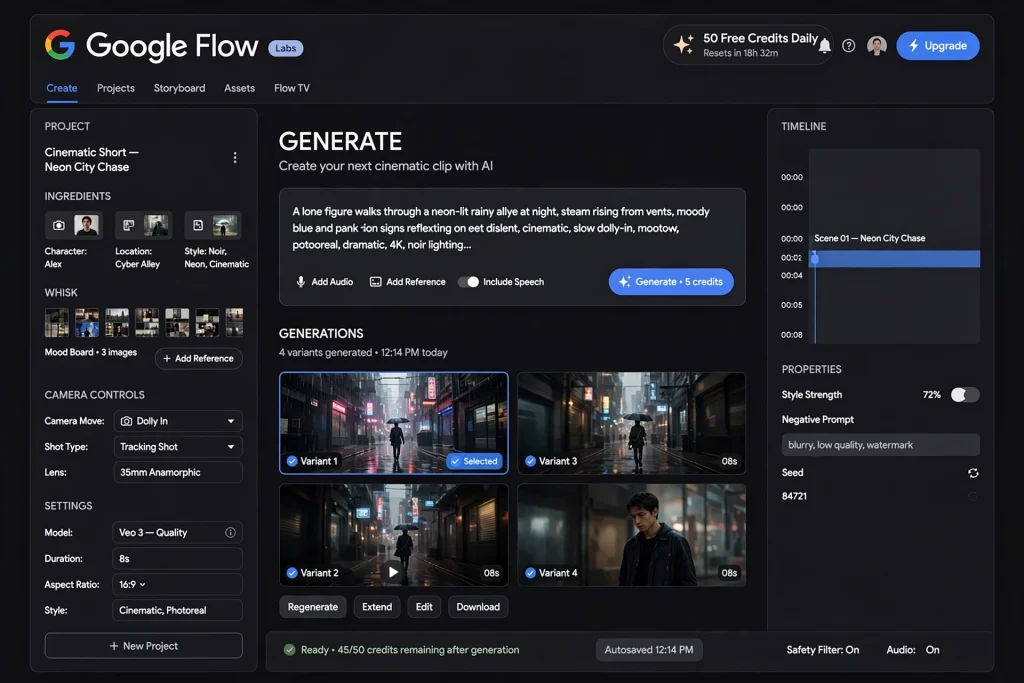
How to Use Veo 3 for Completely Free?
There isn’t just one way to get free Veo 3 access — here are the three that actually work right now.
Method 1: Google Flow’s Daily Free Credits
Google Flow is Google’s own filmmaking interface built around Veo 3, and it’s the most direct free route available. Here’s how to use it:
- Go to labs.google/flow and sign in with any Google account — no credit card required.
- You’ll land on your workspace with a daily credit balance already loaded (currently 50 free credits per day for non-subscribers).
- Click “New Project,” then type your prompt into the text box. Be specific — describe your subject, action, setting, camera movement, and sound for the best results.
- Choose your aspect ratio (16:9 for YouTube, 9:16 for Reels/TikTok) and hit “Generate.”
- Each generation takes anywhere from 30 seconds to a couple of minutes. Once it’s ready, preview it, and download the clip directly to your device.
Your credits reset every 24 hours, so if you run out, come back the next day. This is genuinely the best starting point — it’s stable, official, and doesn’t involve any workarounds.
Method 2: Kling AI’s Free Daily Credits
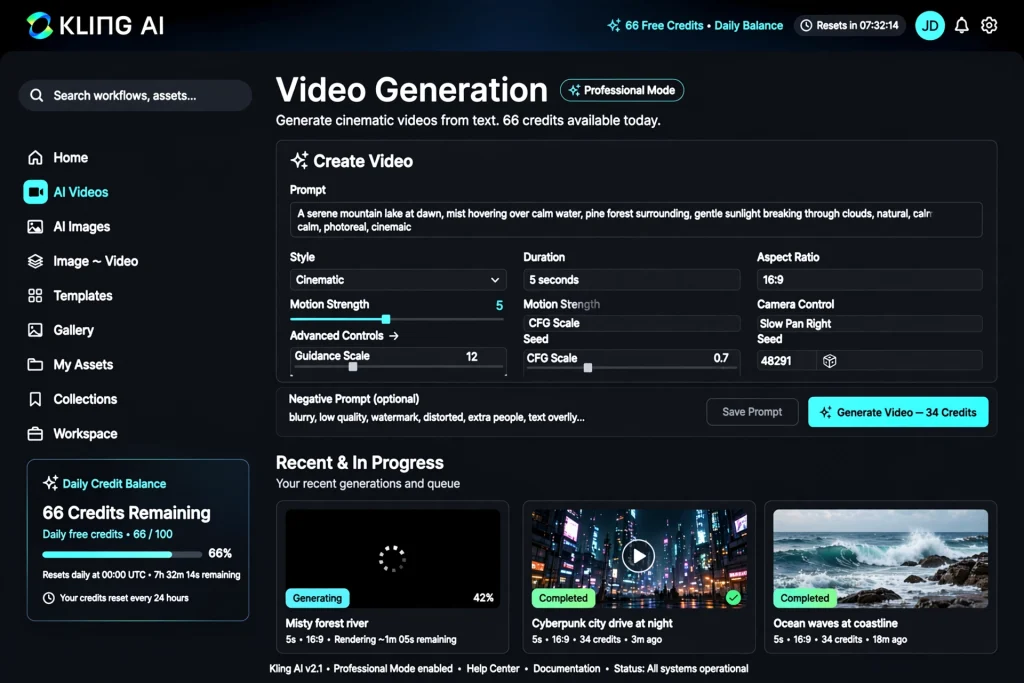
Kling AI isn’t made by Google, but it’s a strong alternative video model you can use alongside Veo 3 to stretch your free output further. Kling’s free plan gives you 66 credits every 24 hours, which resets daily and does not roll over.
In practice, that’s enough for roughly 6 short clips in Standard mode (each costs about 10 credits), or 1–2 clips if you use the higher-quality Professional mode (around 35 credits each). Sign up at Kling’s official site, verify your account, and the 66 credits appear automatically on login. Combine this with your daily Google Flow credits, and you effectively double your free daily video output across two different AI models.
One honest note: Kling’s free tier does include a visible watermark on exports, same as most free AI video tools. Keep that in mind when picking which platform to use for which clip.
Method 3: Google AI Studio
Google AI Studio (aistudio.google.com) is Google’s developer-facing platform, and it also gives access to Veo through a free quota tied to your Google account. It’s a bit more technical than Flow — you’re working with a prompt console rather than a polished editor — but it’s a solid backup option when your Flow credits run out for the day. It’s also useful if you want to batch-test several prompt variations quickly before committing your daily Flow credits to a final version.
How to Actually Use Veo 3 for Free Without Watermark
If you specifically need Veo 3 for free without watermark, a few methods work better than others.
This is where most people get stuck. A few things actually work:
Prompt-level trick: Some users report that explicitly adding a phrase like “(no watermark)” or “clean export, no logo” at the end of their Veo 3 prompt reduces watermark appearance on certain generations. This isn’t officially documented by Google and doesn’t work 100% of the time, so treat it as a minor experiment rather than a guarantee.
Switch tools for clean output: If a specific clip absolutely needs to be watermark-free, your most reliable option is generating on Google Flow’s free tier directly, since Flow’s daily free credits typically export without a visible watermark (unlike Kling’s free tier, which always shows one).
Better prompts, fewer wasted generations: Whichever method you use, a poorly structured prompt wastes your limited free credits on a clip you’ll just delete anyway. We covered the exact prompt formula — subject, action, camera, lighting, style, and sound — with ready-to-use examples in our Veo 3 Prompt Examples guide. Getting the prompt right the first time matters even more when your daily credits are limited.
Can Students Use Veo 3 for Free?
Yes — students get one of the best deals available. Google AI Pro, which unlocks a much larger Veo 3.1 credit allowance than the free daily tier, is available at a discounted student rate through the Google AI Pro student offer for eligible college and university students in supported countries. You’ll need to verify your student status with your school email or a service like SheerID during signup. Combined with your daily free Flow credits, this makes Veo 3 genuinely affordable for coursework, student films, and class projects.
What Happens After Veo 3 Free Trial Ends? Pricing Explained:
Once your daily free credits (or student trial) aren’t enough anymore, you’ll move to a paid plan. Pricing varies a lot depending on where you live — and it’s often cheaper than people expect, especially outside the US. We broke down the exact numbers for two major regions, plan by plan, in our guide to Veo 3 Pricing in Pakistan & India, including free options, entry-level plans, and full Ultra-tier pricing.
If you’re ready to skip the manual prompt-writing process entirely, AuraPrompt’s generator builds structured, Veo-ready prompts for you in one click — helpful for making the most of whichever free or paid tier you’re using.
Frequently Asked Questions
How Do I Use Veo 3 for Free? – 3 Methods You can use Google Flow’s daily free credits, Kling AI’s 66 daily free credits as a secondary source, or Google AI Studio’s free developer quota. Combining all three gives you the most free generations per day.
Does Veo 3’s free tier include a watermark? Generally no — Google Flow’s free daily credits typically export clean, watermark-free clips, though Google states limits and features can change at any time.
Is Kling AI a good free alternative to Veo 3? It’s a useful supplement for extra free generations, but its free tier always includes a visible watermark, so it’s better for testing ideas than for final, publish-ready clips.
Do students really get Veo 3 for free? Not entirely free, but Google AI Pro’s student discount makes the paid tier significantly cheaper for verified students, on top of the free daily credits everyone already gets.
Tried any of these methods yourself? Drop a comment below with which one worked best for you — it genuinely helps other readers pick the right free route.
Leave a Reply