Picking the best AI video generator in 2026 is not easy. There are dozens of tools out there. Half the “best of” lists online still recommend apps that shut down months ago.
I spent real time testing the tools that still work right now. I checked free plans, video quality, watermarks, and how easy each one is to use.
Here’s the honest list — no dead tools, no fluff, just what actually works.
Google Veo 3 – Best AI Video Generator 2026 for Cinematic Quality
Google’s Veo 3 is the most advanced tool on this list. It’s the only one here that creates matching dialogue, sound effects, and background noise along with the video. Most other tools only handle the picture, not the sound.
Best for: Cinematic quality with built-in sound. Free plan: Yes. Google Flow gives 50 free credits every day, no subscription needed. Pros: Best realism, real audio, understands prompts well. Cons: Paid plans get expensive if you use it a lot.
If you use Veo 3, three guides will save you time and money: our Veo 3 prompt examples guide for better results, our Veo 3 pricing in Pakistan & India breakdown, and our guide on using Veo 3 for free without a watermark.
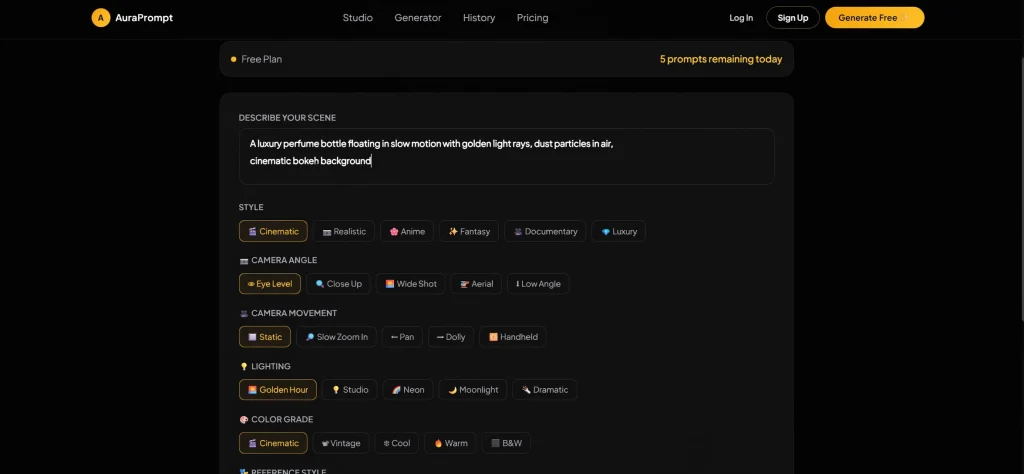
Quick tip: No matter which tool you pick from this list, your video is only as good as your prompt. AuraPrompt is a free tool that builds a proper, ready-to-use prompt for you in one click, so you don’t have to write it by hand every time. We explain this more in our free AI prompt generator guide.
2: Kling AI – Best Free AI Video Generator 2026
Kling is one of the strongest free alternatives to Veo 3 for video quality, especially realistic movement.
Best for: Realistic clips on a free budget. Free plan: Yes — 66 free credits every 24 hours. Pros: Really good motion quality, generous free credits every day. Cons: Free videos come with a visible watermark.
#3: Runway-Best AI Video Generator 2026
Runway is a favorite among video editors and filmmakers because it gives you a lot of control over the final result.
Best for: People who want detailed control over camera and motion. Free plan: A small number of free credits when you sign up, then paid plans. Pros: Strong editing tools, lots of tutorials online. Cons: Free plan is small compared to Kling or Veo 3.
#4: Luma Dream Machine-Best AI Video Generator
Luma is fast and simple, with no real learning curve.
Best for: Quick, casual videos. Free plan: Yes, with a daily limit. Pros: Very fast, easy to use, good for social media. Cons: Clips are shorter than some other tools.
#5: Pika Labs-Best AI Video Generator2026
Pika focuses on fun, stylized effects instead of realism.
Best for: Creative, stylized short clips for social media. Free plan: Yes, with a monthly credit limit. Pros: Fun visual effects, easy prompt-to-clip process. Cons: Not the best choice for realistic or cinematic videos.
#6: Seedance 2.0-Best AI Video Generator 2026
Seedance has become popular fast because it’s genuinely free and watermark-free.
Best for: Free videos with no visible watermark. Free plan: Yes — one of the few tools with clean, watermark-free exports for free. Pros: No watermark, solid video quality for a free tool. Cons: Newer platform, so support is still catching up.
#7: CapCut-Best AI Video Generator2026
CapCut added AI video generation right inside its already-popular editing app.
Best for: Mobile creators who already use CapCut. Free plan: Yes, and it’s generous for casual use. Pros: Works well with CapCut’s editing tools, great for quick social videos. Cons: Less control over fine details than dedicated video tools.
#8: Synthesia
Synthesia works differently from the rest. It uses AI avatars that read a script, instead of creating new scenes.
Best for: Training videos, presentations, and avatar-led content. Free plan: A limited trial, mostly built for paying businesses. Pros: Very polished AI avatars, great for professional use. Cons: Not built for creative or cinematic video at all.
#9: InVideo AI
InVideo AI turns a script or idea into a finished, marketing-style video using templates.
Best for: Marketers who want fast, templated videos. Free plan: Yes, with a watermark and limited exports. Pros: Huge template library, easy for beginners. Cons: Less creative freedom than tools built purely for generation.
#10: Canva AI Video
Canva added AI video generation right into its design tools, which is handy if you already use Canva.
Best for: Teams already using Canva. Free plan: Yes, built into Canva’s free plan with limits. Pros: Easy to use, works with your existing designs and brand colors. Cons: Video quality is behind dedicated tools like Veo 3 or Kling.
Quick Comparison Table
| Tool | Free Plan | Watermark | Best For |
|---|---|---|---|
| Google Veo 3 | Yes (50 credits/day) | No | Cinematic quality + sound |
| Kling AI | Yes (66 credits/day) | Yes | Realistic motion, free |
| Runway | Limited | No | Detailed editing control |
| Luma Dream Machine | Yes | No | Fast, casual videos |
| Pika Labs | Yes | Varies | Stylized, creative clips |
| Seedance 2.0 | Yes | No | Free, clean exports |
| CapCut AI | Yes | No | Mobile/social creators |
| Synthesia | Limited trial | No | AI avatar videos |
| InVideo AI | Yes | Yes | Marketing videos |
| Canva AI Video | Yes | No | Canva users |
Final Verdict
There’s no single “best” tool for everyone — it depends on what you’re making. For the best overall quality with real sound, Google Veo 3 is still the top pick, and it’s now easy to try for free with daily credits. If you want realistic motion without paying anything, Kling AI‘s 66 daily credits are hard to beat, even with the watermark. If you want completely clean, watermark-free videos for free, Seedance 2.0 is the most exciting option right now.
Whichever tool you pick, remember: the prompt matters more than the tool. A weak, one-line prompt wastes your daily credits on a clip you probably won’t use.
Frequently Asked Questions
What is the best AI video generator? Google Veo 3 leads right now, mainly because it creates matching sound and dialogue along with the video, not just the picture.
What is the best free AI video generator? Kling AI and Seedance 2.0 are the strongest free options — Kling for motion quality, Seedance for clean, watermark-free videos.
Which AI video generator is best for beginners? Canva AI Video and CapCut AI are the easiest to start with, since both are part of apps many people already use.
What is the best AI video generator for YouTube? Google Veo 3 and Runway both work well for YouTube — Veo 3 if you want built-in sound, Runway if you want more manual editing control.
Try VEO 3 :https://deepmind.google/models/veo/
Which one are you trying first? Drop a comment with your pick — or tell us if we missed a tool that deserves a spot on this list.
Leave a Reply